I Paid but Didn't Get My Item
💡 Purchases are sent to the in-game Mailbox of the character you were playing when you paid. Purchase mail has no expiry date, so it never disappears on its own.
Check these first
- Make sure you are on the same server and character you paid with. Purchases go only to that character (not to other characters on the same account).
- Open the Mailbox and look at the Character tab (not the Account tab).
- If the mail isn't there, close the game completely and log in again. If the game closed or lost its connection while you were paying, the mail arrives when you log in again.
- If you already collected it, check your inventory. Packages arrive as a box: open it in your inventory to get the items inside.
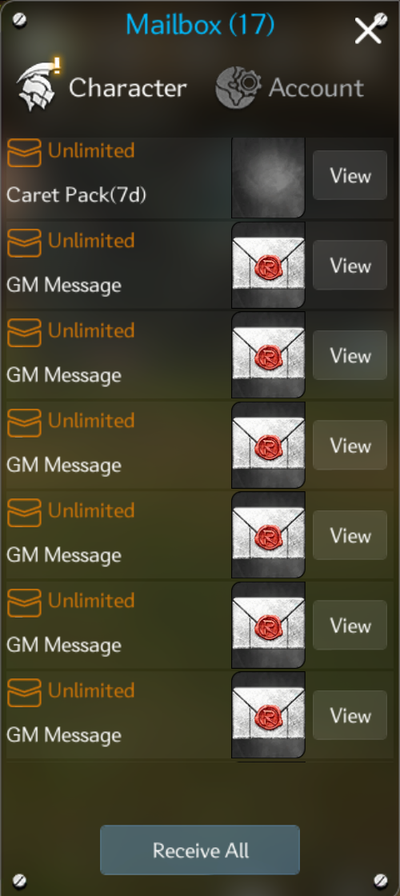
⚠️ If you tap Receive All while the Mailbox has purchases from the last 7 days, a confirmation appears. Once you collect a purchase, it can't be refunded. If you are thinking about a refund, tap Except Purchases → Refunds
Find your order number
Including an order number or a receipt screenshot in your ticket lets us find the payment right away.
| Paid through | Where to find it | Order number |
|---|---|---|
| Google Play (Android, Google Play Games on PC) | Your Google Play receipt e-mail · Google Play order history | Starts with GPA. |
| App Store (iPhone, iPad) | Your Apple receipt e-mail · reportaproblem.apple.com | The Order ID on the receipt |
| Steam | Steam purchase history | A screenshot showing the item name and date |
💡 If the number is hard to copy, just add a photo of the receipt e-mail or purchase history. Our AI assistant reads the number from the photo and matches it with your payment record.
Contact Support
If you still can't find it, contact Support → Payments.
- Enter your server and the name of the character you paid with.
- Tap Send code and enter the 6-digit code sent to that character's in-game Mailbox (this confirms it's you).
- Tell us which item you bought and when, and add the order number or a receipt photo.
- Our AI assistant checks your payment record and tells you when and to which character's Mailbox it was delivered. If there is a delivery problem, the Support team checks it and lets you know the result by in-game mail.
For more on using Support, see How to Use Customer Support. If you can't get into the game to receive the code, see I Can't Log In first.