
How to Use Customer Support
💡 On the Support page, our AI assistant answers right away, and the Support team takes over when a person needs to check. When there is an answer, we also let you know by in-game mail.
Where to open it
- Web: Support in this site's menu (also at the bottom of every page)
- In the game: Customer Support on the login screen · Settings → Account → Community → Support
Write a ticket
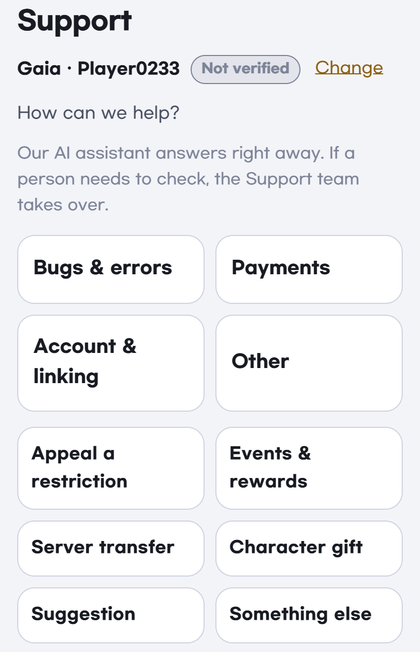
- Enter your Server and Character name and tap Next.
- Choose a topic: Bugs & errors · Payments · Account & linking. The rest are under Other (Appeal a restriction · Events & rewards · Server transfer · Character gift · Suggestion · Something else).
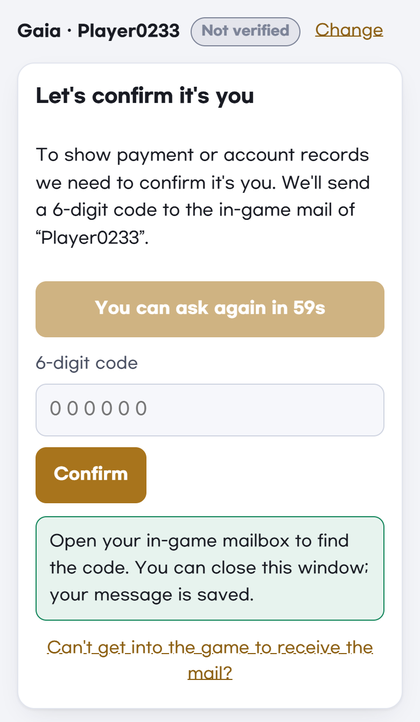
- Payments · Account & linking · Appeal a restriction · Server transfer · Character gift need a quick identity check.
- Tap Send code and a 6-digit code is sent to that character's in-game Mailbox. Open the Mailbox in the game and enter the code.
- The code works for 10 minutes. You can ask for a new one after 60 seconds.
- Once confirmed, we won't ask again on that device for 90 days.
- Your message is saved while you go and check the Mailbox.
- Tell us what happened and tap Send (up to 3,000 characters). You can have up to 5 open tickets.
Add photos and videos
- Photos: up to 5 at a time, 20 MB each. A screenshot helps us find the problem much faster.
- Videos: up to 2 per ticket, 500 MB each (anything after the first 5 minutes is cut). For videos over 100 MB, Wi-Fi is recommended. If the upload stops, pick the same video again and it continues.
- Videos can't be picked inside the game window. After sending, tap Add a video from your phone's browser → Get a code, open the address shown in your phone's browser (Chrome or Safari) and enter the code. It is added to the same ticket. No sign-in needed.
Get answers
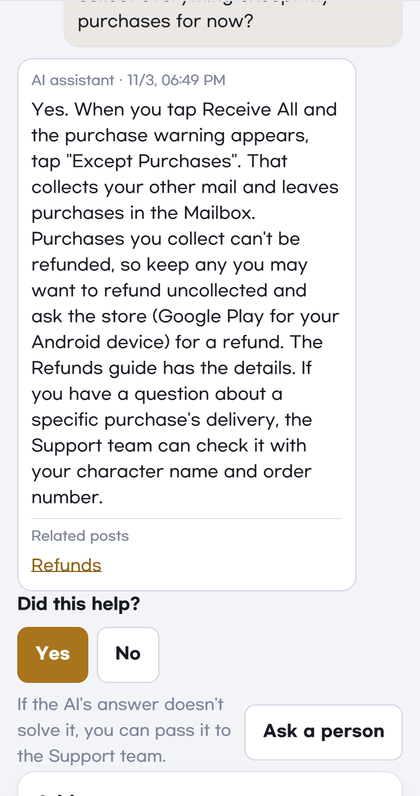
- Our AI assistant answers first. If it helped, tap Yes; if not, tap No or tell us more. If a person needs to look at it, tap Ask a person.
- When the Support team checks a ticket, the page shows when you will get a reply.
- When there is an answer, we let that character know by in-game mail. You can read the conversation under My tickets on the Support page.
- Write in your own language: we reply in the language you use.
- After a fix, tell us It's fixed / Still broken (for payments, I got it / Still missing). A ticket closes after 3 days without a reply to a fix check, or 7 days after an answer. You can Reopen a closed ticket within 7 days.
Known Issues · Me too
- Problems that many players have are posted under Known Issues with their progress.
- If you have the same problem, tap Me too on that post. You don't need to write a ticket. Leave your server and character name and we will let that character know by in-game mail when it's fixed.
If you can't get into the game
If you can't receive in-game mail because of a restriction, a lost guest account or a login error, choose Appeal a restriction or Account & linking, then tap Can't get into the game to receive the mail? on the identity check screen. Your request is taken without the mail check, and the Support team confirms your account another way → I Can't Log In
Good to know
- The Support team never asks for your password.
- Only you and the Support team can see the photos and videos you upload. We remove location data from photos.