
I Can't Log In
💡 First, look at the message shown when you log in. What to do depends on the message.
By message
| Message | What to do |
|---|---|
| The game is currently under maintenance. | Check the end time on Server Status and in the notices, and log in after maintenance ends. |
| Game has been updated! Moving to the Store to update. | Update the game in the store. If the update doesn't show yet, open the store again a little later (each store takes a different amount of time). On Steam, restart Steam to update. |
| Unstable network. Reconnecting... | Switch between Wi-Fi and mobile data. If you use a VPN, turn it off, then restart the game. |
| Server Busy. You are now in the queue. | You are waiting in the login queue. You will get in when it's your turn. |
| Suspended Account · Blocked Account · Blocked Character | Your account or character is restricted. See "If you disagree with a restriction" below. |
My character is missing, or the game starts from the beginning
- Server: on the login screen, use Select Server to choose the server your character is on.
- Account: if you linked your account, make sure you logged in the same way you linked it (Google Play, Apple or Caret Games) → How to Link Your Account
- If you played as a guest and deleted the app or changed devices, see the FAQ in How to Link Your Account.
If you disagree with a restriction
- Tap Customer Support on the restriction notice to open Appeal a restriction on the Support page (on the web: Support → Other → Appeal a restriction).
- Enter your server and character name, then tap Can't get into the game to receive the mail? on the identity check screen. Your appeal is taken without the in-game mail check.
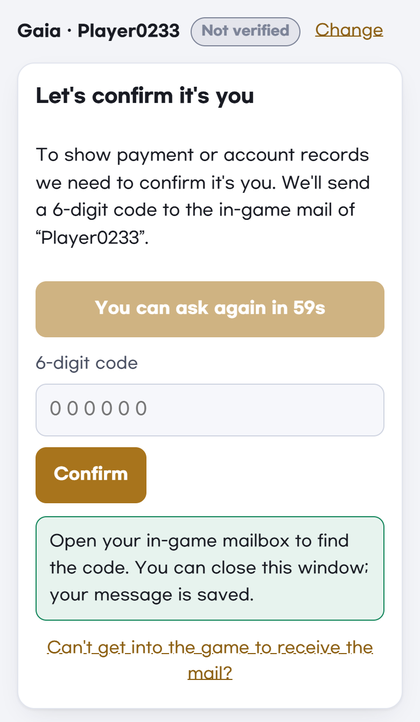
- Please include: how you sign in (Google Play, Apple, Caret Games or guest) · when you last played · your device · order numbers if you ever paid · the message shown when you log in (a screenshot helps).
- The Support team checks it and replies. We can't promise a result before checking.
Still not working?
Contact Support → Account & linking with how you sign in, your device and the message you see (a screenshot helps). If you can't get into the game, use Can't get into the game to receive the mail? as above. See How to Use Customer Support for details.